# 偏好設定

針對版面佈局、首頁、記帳、帳戶和提醒有細部做了一些設定，大家可以根據自己的習慣或需求去做調整。

<figure><img src="/files/xrWxhcU1B48nBjDe8vDw" alt="" width="375"><figcaption></figcaption></figure>

### 版面佈局 <a href="#layout" id="layout"></a>

包含標記顏色、支出收入顏色、字體大小、日期格式和自動切換深淺主題：

<figure><img src="/files/qrITVN6QX4HYN3Uzx1Z7" alt="" width="375"><figcaption></figcaption></figure>

#### 標記顏色 <a href="#notation-color" id="notation-color"></a>

<figure><img src="/files/7aLJEopyJzDsxBeklWgR" alt="" width="375"><figcaption></figcaption></figure>

#### 支出收入顏色 <a href="#expense-income-color" id="expense-income-color"></a>

<figure><img src="/files/32qgMxf3VOQzHcJ5tOwX" alt="" width="375"><figcaption></figcaption></figure>

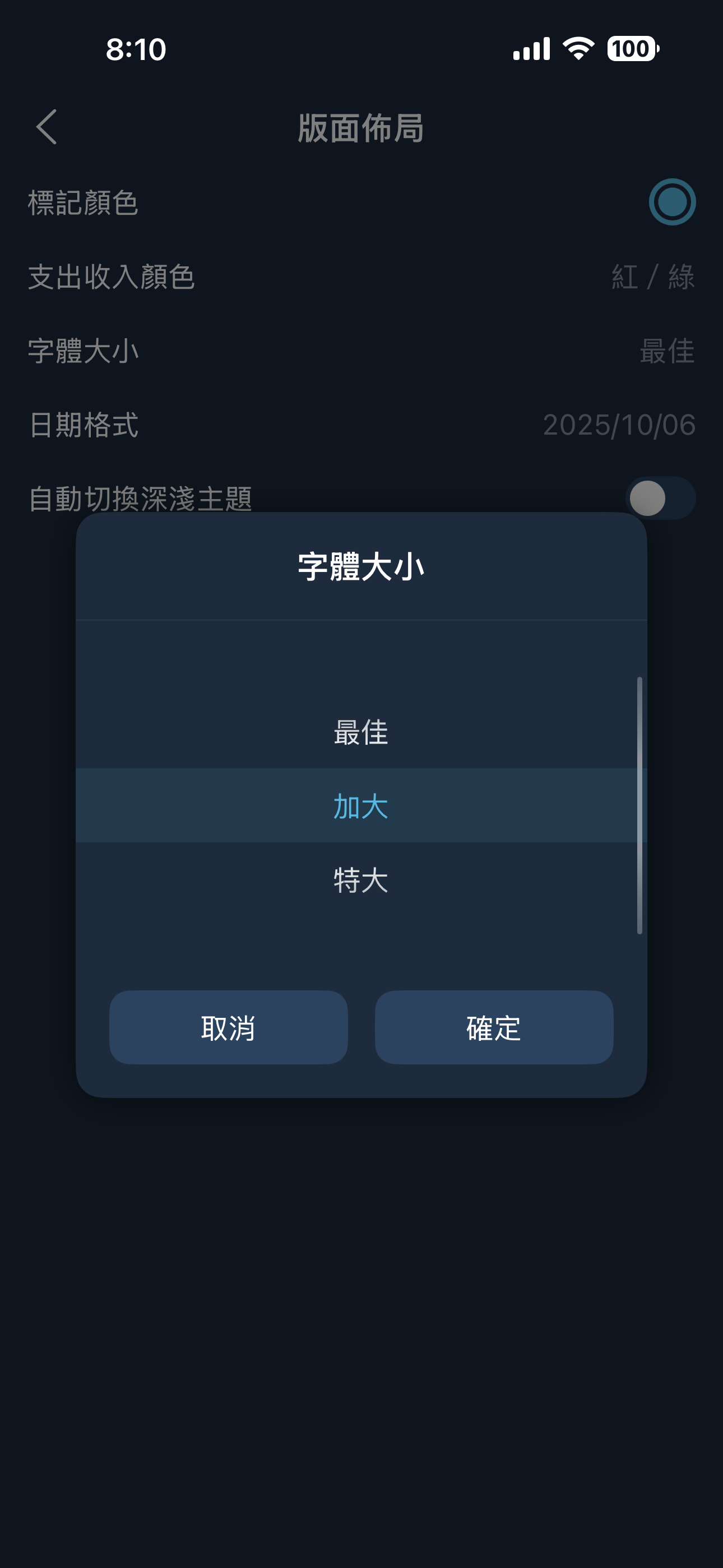
#### 字體大小 <a href="#font-size" id="font-size"></a>

分成最佳、加大、特大三種，如果沒有老花的情況建議採用“最佳”的字體大小，整體畫面佈局會是最協調的狀態。

<figure><img src="/files/MgO1HqfS3skpMaz0g3vp" alt="" width="375"><figcaption></figcaption></figure>

#### 日期格式 <a href="#date-format" id="date-format"></a>

預設的日期格式會根據你系統設定裡面的地區和語系而有不同的格式，用戶可能沒辦法調整到自己習慣的格式，所以這裡直接提供三種格式讓用戶選擇。

<figure><img src="/files/AEl8baXbF7FavmMzxX1a" alt="" width="375"><figcaption></figcaption></figure>

#### 自動切換深淺主題 <a href="#auto-theme" id="auto-theme"></a>

<figure><img src="/files/sQWW7Iv43U0PgeBXIhOH" alt="" width="375"><figcaption></figcaption></figure>

### 首頁 <a href="#home" id="home"></a>

包含月曆起始星期、首頁記錄顯示順序和首頁隱藏紅利回饋：

<figure><img src="/files/06t9Kavs63OAOdJoNCuP" alt="" width="375"><figcaption></figcaption></figure>

#### 月曆起始星期 <a href="#start-week" id="start-week"></a>

<figure><img src="/files/jlZYBWKs8tx7dQshxfrh" alt="" width="375"><figcaption></figcaption></figure>

#### 首頁記錄顯示順序 <a href="#transaction-order" id="transaction-order"></a>

<figure><img src="/files/0XSPEE2oxcR6rrXNw5Ot" alt="" width="375"><figcaption></figcaption></figure>

### 記帳 <a href="#entry" id="entry"></a>

包含自動建議記帳類別、自動建議紅利回饋、提醒入帳顯示記錄時間、相似交易提醒、完成動畫效果、拍照相片存至相簿、數字鍵盤順序、複製記錄帶入時間、完成提醒入帳時間、更新多類別名稱、更新多類別商家和發票歸賬明細的帶入備註：

<figure><img src="/files/NNugTRkVXfWhPaaBRjVl" alt="" width="375"><figcaption></figcaption></figure>

#### 自動建議記帳類別

<figure><img src="/files/k5G8bY4yqkM1FDSvA069" alt="" width="375"><figcaption><p>有開啟</p></figcaption></figure>

<figure><img src="/files/ddjX86pPJGuXXB1hMuoe" alt="" width="375"><figcaption><p>未開啟</p></figcaption></figure>

#### 自動建議紅利回饋 <a href="#auto-reward-suggestion" id="auto-reward-suggestion"></a>

如果有開啟則會依照記帳時所選類別去找出上次標記的回饋標籤當作預設值，否則則只會自動帶入有設定成**基本回饋**的紅利回饋。

#### 動畫效果

<figure><img src="/files/GgcmldkQC3pknqFuYxm4" alt="" width="375"><figcaption><p>有開啟</p></figcaption></figure>

<figure><img src="/files/zkTDHVgI5Vnd3FIaUd4O" alt="" width="375"><figcaption><p>未開啟</p></figcaption></figure>

#### 數字鍵盤順序

<figure><img src="/files/B0fWmml1G5XzV4khxy7E" alt="" width="375"><figcaption></figcaption></figure>

<figure><img src="/files/2NYYI0Q22HxTxVzMLSPA" alt="" width="375"><figcaption><p>電話</p></figcaption></figure>

<figure><img src="/files/f72B97sVqLShhcTuMoYX" alt="" width="375"><figcaption><p>計算機</p></figcaption></figure>

#### 複製記錄帶入時間

如果你複製了 2025/9/1  10:30 的記錄，你可以在這裡設定複製後新記錄的預設日期時間，看是要保留原先日期時間，又或是以現在日期時間為主，以你平常使用習慣去做設定。

<figure><img src="/files/jJtmDWPaaCr3hgdwTu3d" alt="" width="375"><figcaption></figcaption></figure>

#### 完成提醒入帳時間

預設是依照完成入帳時的時間做記錄，如果你想要保持原本記錄的時間，可以來這裡做調整。

<figure><img src="/files/YCWZ5WXbJSxbhF9tTJDj" alt="" width="375"><figcaption></figcaption></figure>

#### 更新多類別名稱

預設會在你修改多類別名稱時，跳出視窗詢問你後續操作，你也可以直接在記帳設定裡面指定預設的操作行為。

<figure><img src="/files/lVpYUeEKRA1IKkSZ8a0k" alt="" width="375"><figcaption></figcaption></figure>

<figure><img src="/files/uZlt63wipvvBJr0BdGck" alt="" width="375"><figcaption></figcaption></figure>

#### 更新多類別商家

預設會在你修改多類別商家時，跳出視窗詢問你後續操作，你也可以直接在記帳設定裡面指定預設的操作行為。

<figure><img src="/files/flINDWwFieViRZuRqP5l" alt="" width="375"><figcaption></figcaption></figure>

<figure><img src="/files/ijjav2Eur4ySgvGPP3Mv" alt="" width="375"><figcaption></figcaption></figure>

#### 發票歸賬明細的帶入備註

預設會在發票歸賬到現有記錄時，跳出視窗詢問你後續操作，你也可以直接在記帳設定裡面指定預設的操作行為。

<figure><img src="/files/tcbWyuUmOaWq27Cfvw5D" alt="" width="375"><figcaption></figcaption></figure>

<figure><img src="/files/tn9iSR6DWJJwa2htpf4X" alt="" width="375"><figcaption></figcaption></figure>

### 帳戶 <a href="#account" id="account"></a>

包含數字換算單位、總額顯示縮寫、主帳戶總額計算和帳戶分組總額計算：

<figure><img src="/files/qpbYYTXTx0jNdO8w4YpN" alt="" width="375"><figcaption></figcaption></figure>

#### 數字換算單位

<figure><img src="/files/LyCGVjHy6rmXXIKll1qs" alt="" width="375"><figcaption></figcaption></figure>

#### 主帳戶總額計算

<figure><img src="/files/AhqNQeCzQfF8dPRLvsqP" alt="" width="375"><figcaption></figcaption></figure>

#### 分組帳戶總額計算

<figure><img src="/files/YC4SRQ7IES7yBxyfxFVF" alt="" width="375"><figcaption></figcaption></figure>


---

# Agent Instructions: Querying This Documentation

If you need additional information that is not directly available in this page, you can query the documentation dynamically by asking a question.

Perform an HTTP GET request on the current page URL with the `ask` query parameter:

```
GET https://doc.moze.app/feature/preference.md?ask=<question>
```

The question should be specific, self-contained, and written in natural language.
The response will contain a direct answer to the question and relevant excerpts and sources from the documentation.

Use this mechanism when the answer is not explicitly present in the current page, you need clarification or additional context, or you want to retrieve related documentation sections.