> For the complete documentation index, see [llms.txt](https://doc.moze.app/llms.txt). Markdown versions of documentation pages are available by appending `.md` to page URLs; this page is available as [Markdown](https://doc.moze.app/record/deposit.md).
# 訂金尾款追蹤 🔖
🔖 代表進階功能,新手可暫時略過
訂飯店、訂餐廳、訂做家具,常常是先付一筆訂金,過一陣子再付尾款。這時候可以打開「**訂金尾款追蹤**」:記訂金的時候順便填好尾款的金額和日期,MOZE 會自動建立一筆尾款記錄,時間到了提醒你付款。兩筆記錄也會關聯在一起,隨時都看得到這筆交易總共花了多少。
## 開啟訂金尾款追蹤
1. 先像平常一樣記下訂金這筆支出,選好類別、帳戶和金額。
2. 點擊記錄頁上顯示「**單次**」的欄位,打開進階設定。
3. 在「**單次**」分頁的「**入帳方式**」下方,打開「**訂金尾款追蹤**」。
4. 填上「**尾款金額**」和「**尾款日期**」。還不確定的話,保持「**未定**」就好。
5. 按下「**確定**」,再把記錄存檔。
存檔後,MOZE 會自動建立一筆[提醒入帳](/record/reminder.md)的尾款記錄,金額和日期就是你填的尾款金額與尾款日期。
## 範例一:訂飯店,尾款金額和日期都確定
你訂了 10 月 17 日入住的飯店,先刷卡付了 1,000 元訂金,入住當天要再付 5,000 元尾款。
記下這筆 1,000 元的住宿訂金,在進階設定打開「**訂金尾款追蹤**」,尾款金額填 5,000,尾款日期選 2026/10/17。
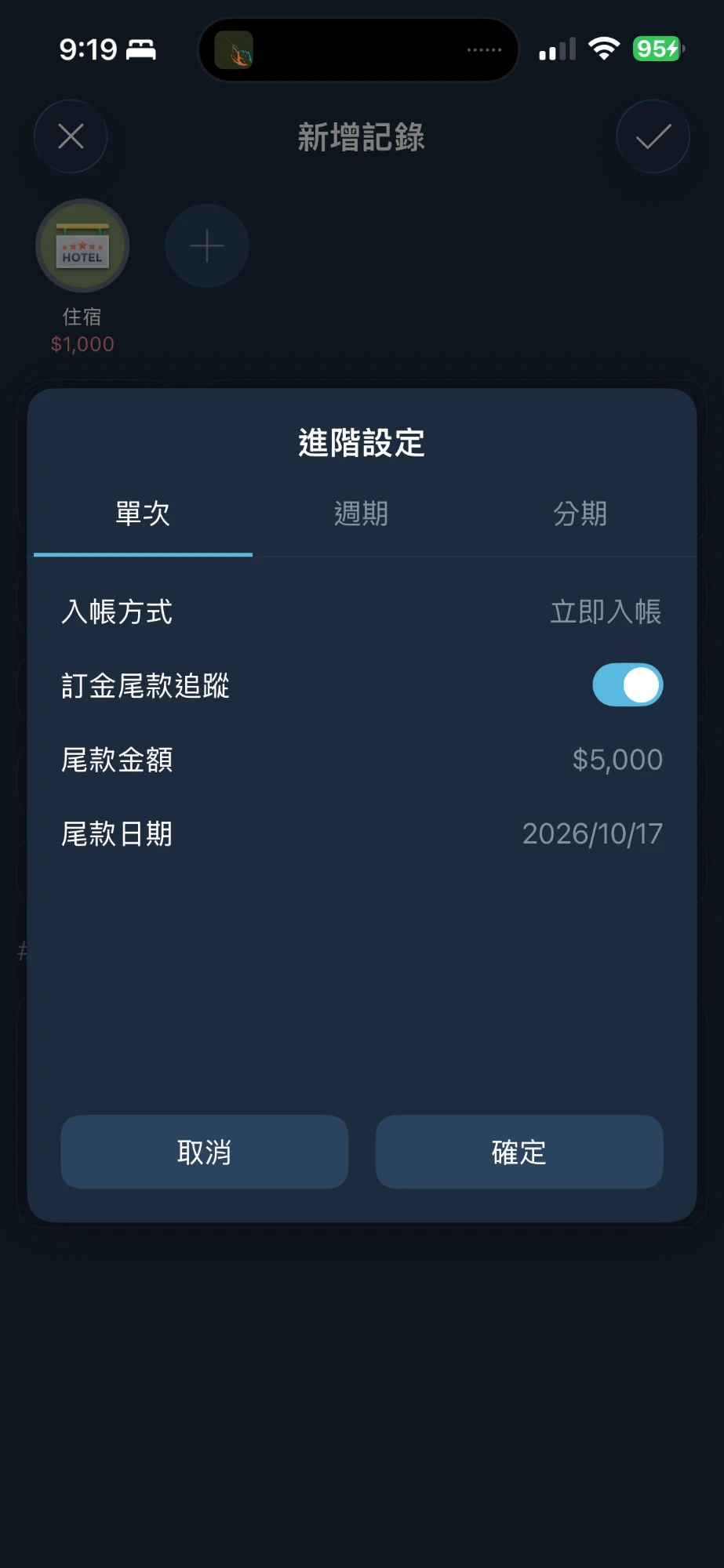 回到記錄頁,下方會顯示「**尾款 $5,000,交易總計 $6,000,預計於 26/10/17 支付**」,原本顯示「單次」的欄位也會變成「**訂金**」。
 到了 10 月 17 日,通知中心會提醒你這筆尾款,首頁當天也看得到它,旁邊標示著「**待完成交易**」。入住付完尾款後,再把它完成入帳就好(見下方的[補上尾款](#complete))。
 ## 範例二:訂餐廳,尾款金額和日期都未定
訂位時先付了 500 元訂金,但還不知道哪天去吃,也不知道最後會吃多少。
記下這筆 500 元的晚餐訂金,打開「**訂金尾款追蹤**」,尾款金額和尾款日期都保持「**未定**」。
## 範例二:訂餐廳,尾款金額和日期都未定
訂位時先付了 500 元訂金,但還不知道哪天去吃,也不知道最後會吃多少。
記下這筆 500 元的晚餐訂金,打開「**訂金尾款追蹤**」,尾款金額和尾款日期都保持「**未定**」。
 存檔後,通知中心的「**待完成交易**」會馬上出現這筆尾款,標示「**尾款・已付訂金 $500**」。尾款日期未定時,這筆尾款會一直留在通知中心,提醒你之後要補上。
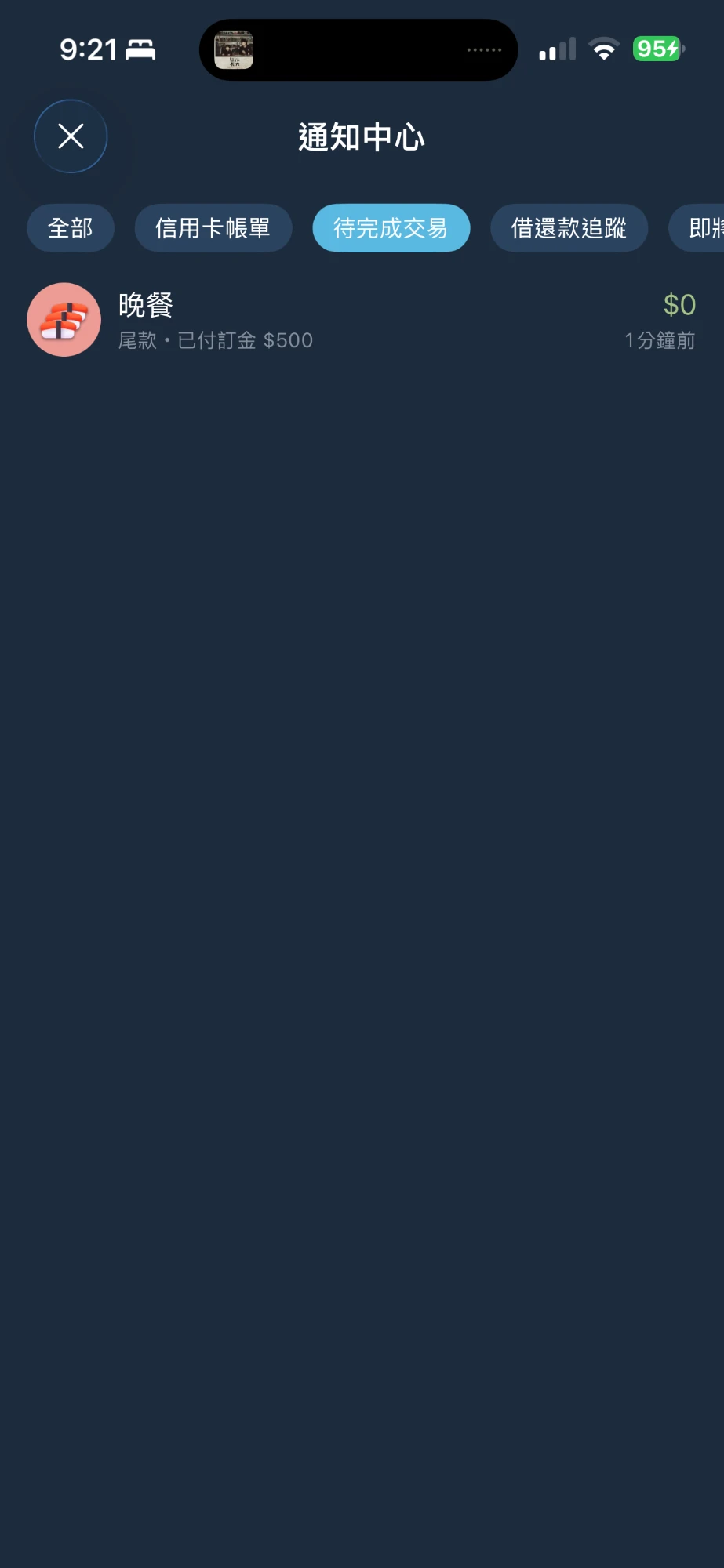 吃完晚餐後,在通知中心左滑這筆尾款,填上實際付的金額(例如 2,780 元),選好付款的帳戶。下方會顯示「**含訂金 $500,交易總計 $3,280**」,確認沒問題後點擊右上角的勾勾,就完成入帳了。
 ## 補上尾款
付完尾款後,可以從這兩個地方補上:
* 在通知中心的「**待完成交易**」,左滑這筆尾款
* 打開訂金的記錄明細,點擊「**點擊補尾款**」那一行提示
打開後,照實際情況修改金額、帳戶或日期即可。尾款也是刷卡付的話,入帳方式一樣可以選[延後入帳](/record/postpone.md);尾款包含不同類別的消費,也可以在這時候[拆帳](/record/split-categories.md)。完成後,這筆尾款就會變成一般的記錄。
## 查看訂金與尾款
開啟追蹤後,訂金和尾款在記錄清單上會分別標示「**訂金**」和「**尾款**」。打開任一筆的記錄明細,都能看到另一筆的資訊,點擊提示就能切換過去。
| 記錄 | 明細頁的提示 |
| --------- | ------------------------------------------- |
| 訂金(尾款還沒付) | 尾款 $5,000,交易總計 $6,000,預計於 26/10/17 支付,點擊補尾款 |
| 訂金(尾款已付) | 尾款 $5,000 已於 26/10/17 支付,交易總計 $6,000,點擊查看 |
| 尾款 | 含訂金 $1,000,交易總計 $6,000,點擊查看訂金 |
## 統計怎麼算
訂金和尾款會各自算在**實際付款的那一天**。例如 9 月付了 1,000 元訂金、10 月付了 5,000 元尾款,報表和預算就會在 9 月算 1,000 元、10 月算 5,000 元。
尾款完成入帳之前,不會算進統計,也不會影響帳戶餘額。
想看整筆交易的總金額,除了明細頁的「交易總計」,也可以把訂金和尾款放在同一個[專案](/prepare/project.md),或是用商家篩選報表。尾款記錄建立時,會沿用訂金的類別、專案和商家。
## 使用提醒
* 只有付錢出去的記錄可以開啟,例如支出、幫別人代付的[應收款項](/record/payables-receivables.md)和[轉帳](/record/transfer.md)。收入記錄不會出現這個開關。
* [週期](/record/recurring.md)和[分期](/record/installment.md)的記錄不能開啟。訂金尾款追蹤開著的時候,也不能切換到「**週期**」或「**分期**」分頁。
* 刷卡付訂金時,入帳方式一樣可以選[延後入帳](/record/postpone.md),兩個設定可以同時使用。
* 如果訂金本身也還沒付(入帳方式選了[提醒入帳](/record/reminder.md)),要等訂金完成入帳之後,尾款才會出現在通知中心。
* 尾款補上之前,想修改尾款金額或日期,打開訂金的進階設定修改即可。已經設定的尾款日期想改回未定,點擊「**尾款日期**」後選擇「**清空日期**」。
{% hint style="info" %}
**取消訂位、訂金也退回了**:直接刪除訂金,還沒補上的尾款會一起刪除
**訂金被沒收**:刪除那筆尾款就好,訂金會留下來,成為一筆一般的支出
{% endhint %}
---
# Agent Instructions
This documentation is published with GitBook. GitBook is the documentation platform designed so that both humans and AI agents can read, navigate, and reason over technical content effectively. Learn more at gitbook.com.
## Querying This Documentation
If you need additional information that is not directly available in this page, you can query the documentation by asking a question.
Perform an HTTP GET request on the following URL with the `ask` and `goal` query parameters:
```
GET https://doc.moze.app/record/deposit.md?ask=&goal=
```
`ask` is the immediate question: it should be specific, self-contained, and written in natural language.
`goal` is what the user is ultimately trying to achieve, the reason they need the answer. Sharing it helps GitBook give you a better, more relevant answer. A goal is most helpful when it describes the outcome the user wants rather than restating the question. For example, with `ask=how do I create an API token`, a goal like `automate deployments from our CI pipeline` lets GitBook tailor the answer to that use case.
The response will contain a direct answer to the question and relevant excerpts and sources from the documentation.
Use this mechanism when the answer is not explicitly present in the current page, you need clarification or additional context, or you want to retrieve related documentation sections.
## 補上尾款
付完尾款後,可以從這兩個地方補上:
* 在通知中心的「**待完成交易**」,左滑這筆尾款
* 打開訂金的記錄明細,點擊「**點擊補尾款**」那一行提示
打開後,照實際情況修改金額、帳戶或日期即可。尾款也是刷卡付的話,入帳方式一樣可以選[延後入帳](/record/postpone.md);尾款包含不同類別的消費,也可以在這時候[拆帳](/record/split-categories.md)。完成後,這筆尾款就會變成一般的記錄。
## 查看訂金與尾款
開啟追蹤後,訂金和尾款在記錄清單上會分別標示「**訂金**」和「**尾款**」。打開任一筆的記錄明細,都能看到另一筆的資訊,點擊提示就能切換過去。
| 記錄 | 明細頁的提示 |
| --------- | ------------------------------------------- |
| 訂金(尾款還沒付) | 尾款 $5,000,交易總計 $6,000,預計於 26/10/17 支付,點擊補尾款 |
| 訂金(尾款已付) | 尾款 $5,000 已於 26/10/17 支付,交易總計 $6,000,點擊查看 |
| 尾款 | 含訂金 $1,000,交易總計 $6,000,點擊查看訂金 |
## 統計怎麼算
訂金和尾款會各自算在**實際付款的那一天**。例如 9 月付了 1,000 元訂金、10 月付了 5,000 元尾款,報表和預算就會在 9 月算 1,000 元、10 月算 5,000 元。
尾款完成入帳之前,不會算進統計,也不會影響帳戶餘額。
想看整筆交易的總金額,除了明細頁的「交易總計」,也可以把訂金和尾款放在同一個[專案](/prepare/project.md),或是用商家篩選報表。尾款記錄建立時,會沿用訂金的類別、專案和商家。
## 使用提醒
* 只有付錢出去的記錄可以開啟,例如支出、幫別人代付的[應收款項](/record/payables-receivables.md)和[轉帳](/record/transfer.md)。收入記錄不會出現這個開關。
* [週期](/record/recurring.md)和[分期](/record/installment.md)的記錄不能開啟。訂金尾款追蹤開著的時候,也不能切換到「**週期**」或「**分期**」分頁。
* 刷卡付訂金時,入帳方式一樣可以選[延後入帳](/record/postpone.md),兩個設定可以同時使用。
* 如果訂金本身也還沒付(入帳方式選了[提醒入帳](/record/reminder.md)),要等訂金完成入帳之後,尾款才會出現在通知中心。
* 尾款補上之前,想修改尾款金額或日期,打開訂金的進階設定修改即可。已經設定的尾款日期想改回未定,點擊「**尾款日期**」後選擇「**清空日期**」。
{% hint style="info" %}
**取消訂位、訂金也退回了**:直接刪除訂金,還沒補上的尾款會一起刪除
**訂金被沒收**:刪除那筆尾款就好,訂金會留下來,成為一筆一般的支出
{% endhint %}
---
# Agent Instructions
This documentation is published with GitBook. GitBook is the documentation platform designed so that both humans and AI agents can read, navigate, and reason over technical content effectively. Learn more at gitbook.com.
## Querying This Documentation
If you need additional information that is not directly available in this page, you can query the documentation by asking a question.
Perform an HTTP GET request on the following URL with the `ask` and `goal` query parameters:
```
GET https://doc.moze.app/record/deposit.md?ask=&goal=
```
`ask` is the immediate question: it should be specific, self-contained, and written in natural language.
`goal` is what the user is ultimately trying to achieve, the reason they need the answer. Sharing it helps GitBook give you a better, more relevant answer. A goal is most helpful when it describes the outcome the user wants rather than restating the question. For example, with `ask=how do I create an API token`, a goal like `automate deployments from our CI pipeline` lets GitBook tailor the answer to that use case.
The response will contain a direct answer to the question and relevant excerpts and sources from the documentation.
Use this mechanism when the answer is not explicitly present in the current page, you need clarification or additional context, or you want to retrieve related documentation sections.