### 提前償還本金
如果你剛好領到工作獎金,想提前償還部分本金(例如 NT$20000),記錄完成後系統會自動調整後面的分期金額,可以看到利息總計從 4181 變成 3348。
{% hint style="info" %}
關於**提前償還本金**,這裡有[一篇文章](https://medium.com/yp%E6%8A%95%E8%B3%87%E7%90%86%E8%B2%A1%E7%AD%86%E8%A8%98/%E6%88%BF%E8%B2%B8%E6%98%AF%E5%90%A6%E8%A6%81%E6%8F%90%E5%89%8D%E9%82%84%E5%91%A2-4c74370825ad)可以參考。
{% endhint %}
### 提前繳清分期
如果你是提前一次繳清分期,系統會自動算出尚未償還的本金和當期利息,並移除未來的分期記錄。
### 終止未來分期
如果遇到銀行更改分期期數,你可以先終止未來分期,把原本的分期停掉,之後再依照剩餘金額另外建立一個新的分期事件即可。
## 分期退款
如果進行中的分期因為商品退貨需要退款,你可以在指定期數進行單筆退款或全數退款。
## 寬限期
寬限期是指在貸款期限內,申請一段特定期間只繳利息、不攤還本金,也就是「還息不還本」。
例如設定 12 個月的寬限期,前 12 個月只需繳交利息,等到第 13 期再開始繳納本金。
---
# Agent Instructions
This documentation is published with GitBook. GitBook is the documentation platform designed so that both humans and AI agents can read, navigate, and reason over technical content effectively. Learn more at gitbook.com.
## Querying This Documentation
If you need additional information that is not directly available in this page, you can query the documentation dynamically by asking a question.
Perform an HTTP GET request on the current page URL with the `ask` query parameter, and the optional `goal` query parameter:
```
GET https://doc.moze.app/record/installment.md?ask=&goal=
```
`ask` is the immediate question: it should be specific, self-contained, and written in natural language.
`goal` is optional and describes the broader end goal you are ultimately trying to accomplish on behalf of the user. GitBook uses it to tailor the answer towards what is most useful for that goal.
The response will contain a direct answer to the question and relevant excerpts and sources from the documentation.
Use this mechanism when the answer is not explicitly present in the current page, you need clarification or additional context, or you want to retrieve related documentation sections.
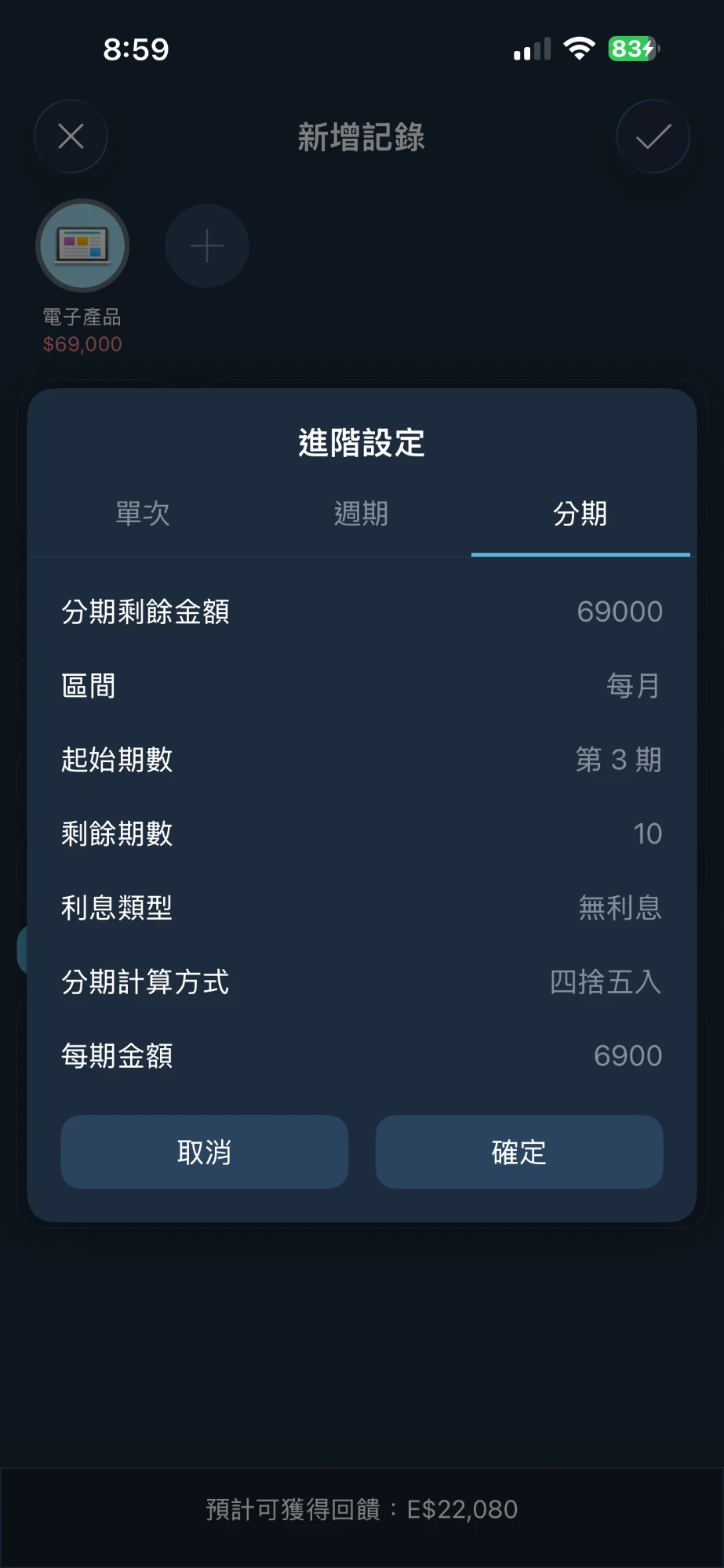


 ### 從中途開始記
如果這筆分期在你開始記帳之前就已經繳了幾期,例如電子產品分 12 期、已經繳完 2 期,不需要把前面 2 期補記回來。在進階設定的「**起始期數**」填上接下來要繳的那一期(第 3 期),其他欄位就會改成填剩下的部分:
* **剩餘期數**:還沒繳的期數(10 期)
* **分期剩餘金額**:還沒繳的總金額($69,000)
之後產生的記錄會從第 3 期開始編號,明細上顯示的期數也會跟銀行帳單一致(例如 #3 / 12)。
### 從中途開始記
如果這筆分期在你開始記帳之前就已經繳了幾期,例如電子產品分 12 期、已經繳完 2 期,不需要把前面 2 期補記回來。在進階設定的「**起始期數**」填上接下來要繳的那一期(第 3 期),其他欄位就會改成填剩下的部分:
* **剩餘期數**:還沒繳的期數(10 期)
* **分期剩餘金額**:還沒繳的總金額($69,000)
之後產生的記錄會從第 3 期開始編號,明細上顯示的期數也會跟銀行帳單一致(例如 #3 / 12)。


 完成分期付款後,可以在當天收到一筆貸款入帳記錄。
 你可以從**更多功能**頁面進入分期事件,查看相關記錄。

 這裡會統計你本金和利息的還款狀態,也可以看到每一期應付的本金和利息金額。
 ## 編輯/刪除
在事件項目上左滑會出現**編輯**和**刪除**選單,可以處理整筆分期事件。
## 編輯/刪除
在事件項目上左滑會出現**編輯**和**刪除**選單,可以處理整筆分期事件。
 你也可以從分期明細裡點擊特定期數,去**修改單筆記錄**、**修改連同未來分期**、**提前償還本金**或**提前繳清分期**。
 ### 修改單筆記錄
有時候銀行的分期本金或利息會跟系統算出來的結果有些許落差(各家銀行的計算方式可能有微小差異)。你可以直接調整指定期數的記錄內容,完成後系統會詢問你:要單獨修改這筆記錄(不影響其他期數),還是讓系統依剩餘本金重新計算,自動調整後面期數的數據。
### 修改單筆記錄
有時候銀行的分期本金或利息會跟系統算出來的結果有些許落差(各家銀行的計算方式可能有微小差異)。你可以直接調整指定期數的記錄內容,完成後系統會詢問你:要單獨修改這筆記錄(不影響其他期數),還是讓系統依剩餘本金重新計算,自動調整後面期數的數據。


 {% hint style="info" %}
關於**提前償還本金**,這裡有[一篇文章](https://medium.com/yp%E6%8A%95%E8%B3%87%E7%90%86%E8%B2%A1%E7%AD%86%E8%A8%98/%E6%88%BF%E8%B2%B8%E6%98%AF%E5%90%A6%E8%A6%81%E6%8F%90%E5%89%8D%E9%82%84%E5%91%A2-4c74370825ad)可以參考。
{% endhint %}
### 提前繳清分期
如果你是提前一次繳清分期,系統會自動算出尚未償還的本金和當期利息,並移除未來的分期記錄。
{% hint style="info" %}
關於**提前償還本金**,這裡有[一篇文章](https://medium.com/yp%E6%8A%95%E8%B3%87%E7%90%86%E8%B2%A1%E7%AD%86%E8%A8%98/%E6%88%BF%E8%B2%B8%E6%98%AF%E5%90%A6%E8%A6%81%E6%8F%90%E5%89%8D%E9%82%84%E5%91%A2-4c74370825ad)可以參考。
{% endhint %}
### 提前繳清分期
如果你是提前一次繳清分期,系統會自動算出尚未償還的本金和當期利息,並移除未來的分期記錄。
 ### 終止未來分期
如果遇到銀行更改分期期數,你可以先終止未來分期,把原本的分期停掉,之後再依照剩餘金額另外建立一個新的分期事件即可。
### 終止未來分期
如果遇到銀行更改分期期數,你可以先終止未來分期,把原本的分期停掉,之後再依照剩餘金額另外建立一個新的分期事件即可。


 例如設定 12 個月的寬限期,前 12 個月只需繳交利息,等到第 13 期再開始繳納本金。
 ---
# Agent Instructions
This documentation is published with GitBook. GitBook is the documentation platform designed so that both humans and AI agents can read, navigate, and reason over technical content effectively. Learn more at gitbook.com.
## Querying This Documentation
If you need additional information that is not directly available in this page, you can query the documentation dynamically by asking a question.
Perform an HTTP GET request on the current page URL with the `ask` query parameter, and the optional `goal` query parameter:
```
GET https://doc.moze.app/record/installment.md?ask=
---
# Agent Instructions
This documentation is published with GitBook. GitBook is the documentation platform designed so that both humans and AI agents can read, navigate, and reason over technical content effectively. Learn more at gitbook.com.
## Querying This Documentation
If you need additional information that is not directly available in this page, you can query the documentation dynamically by asking a question.
Perform an HTTP GET request on the current page URL with the `ask` query parameter, and the optional `goal` query parameter:
```
GET https://doc.moze.app/record/installment.md?ask=